在Windows工具列上 增加非MainForm的視窗
https://stackoverflow.com/questions/5493591/how-can-i-get-taskbar-buttons-for-forms-that-arent-the-main-form
type
TMyForm = class(TForm)
...
在Windows工具列上 增加非MainForm的視窗
https://stackoverflow.com/questions/5493591/how-can-i-get-taskbar-buttons-for-forms-that-arent-the-main-form
type
TMyForm = class(TForm)
...
使用TStringList 達成依照數字大小排序
unit XBCurrList;
interface
uses System.Classes, System.Math, System.SysUtils;
type
procedure TForm1.Edit1KeyPress (Sender: TObject; var Key: Char) ;
begin
If Key = #13 Then Begin
If HiWord(GetKeyState(VK_SHIFT)) <> 0 then
SelectNext(Sender as TWinControl,False,True)
Delphi 四捨五入
//RoundF 商用的四捨五入
function RoundF(X: Extended; Decimal: integer = 0): Extended;
function RoundI(X: Extended): Int64;
begin
(* ---------------------------------------------------------------------------------------------- *)
// XBPassWordEdit_Unit
// Author: Kamilia
Window Api
QueryPerformanceFrequency
以下簡稱 CPU頻率?
QueryPerformanceCounter
http://docwiki.appmethod.com/appmethod/1.16/libraries/en/FMX.Dialogs.InputQuery
InputQuery('Login',['Username',#1'Password:'],['',''],
procedure(constAResult:TModalResult;constAValues:arrayofstring)
begin
     case AResult of
using System.Runtime.InteropServices; //使用Winapi 讀寫 INI
...
//INI副程式
#region SetupIni
public class SetupIni
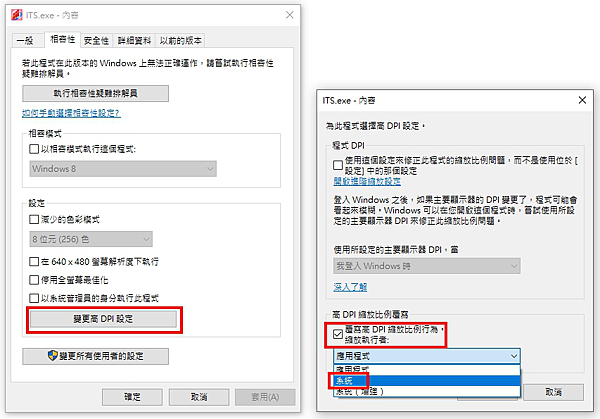
找了好久 終於找到高DPI的解法
1.手動執行 執行檔>右鍵內容>變更高DPI設定>覆寫高DPIn縮放比例行為 打勾> 縮放執行者 選系統 (選應用程式無效)
2. https://superuser.com/questions/1230346/overriding-high-dpi-scaling-from-the-command-line

使用Python 實作WOL代碼如下
import socket
def GetMagicPacket(aMacAddr): #取得WOL封包
_Packet = b'' #前面要加6個FF
return 6 * _Packet + 16 * aMacAddr
偵測手機倒退鍵
Form > KeyDown
procedure TForm1.FormKeyDown(Sender: TObject; var Key: Word; var KeyChar: Char;
Shift: TShiftState);
begin